Row Tracker Tutorial — Track a Filet Cat + 5-Color Strawberries Pixel in 5 Minutes
You don't lose your place on a 10-row scarf. You lose your place on a 40-row, 35-stitch-wide pet portrait where row 23 has eight color changes and row 24 has nine — and you came back to it after a phone call. That's the moment the tracker earns its keep. This is a 5-minute tutorial showing how it works on two patterns that span the easy/hard spectrum.
The three tracker modes you'll see on every pattern
When you open a pattern's tracker (the "Walk through →" button on any pattern page), three views of the current row appear together on one screen. They redundantly answer the same question — where am I? — from three different angles. Glance at whichever your eyes catch first:
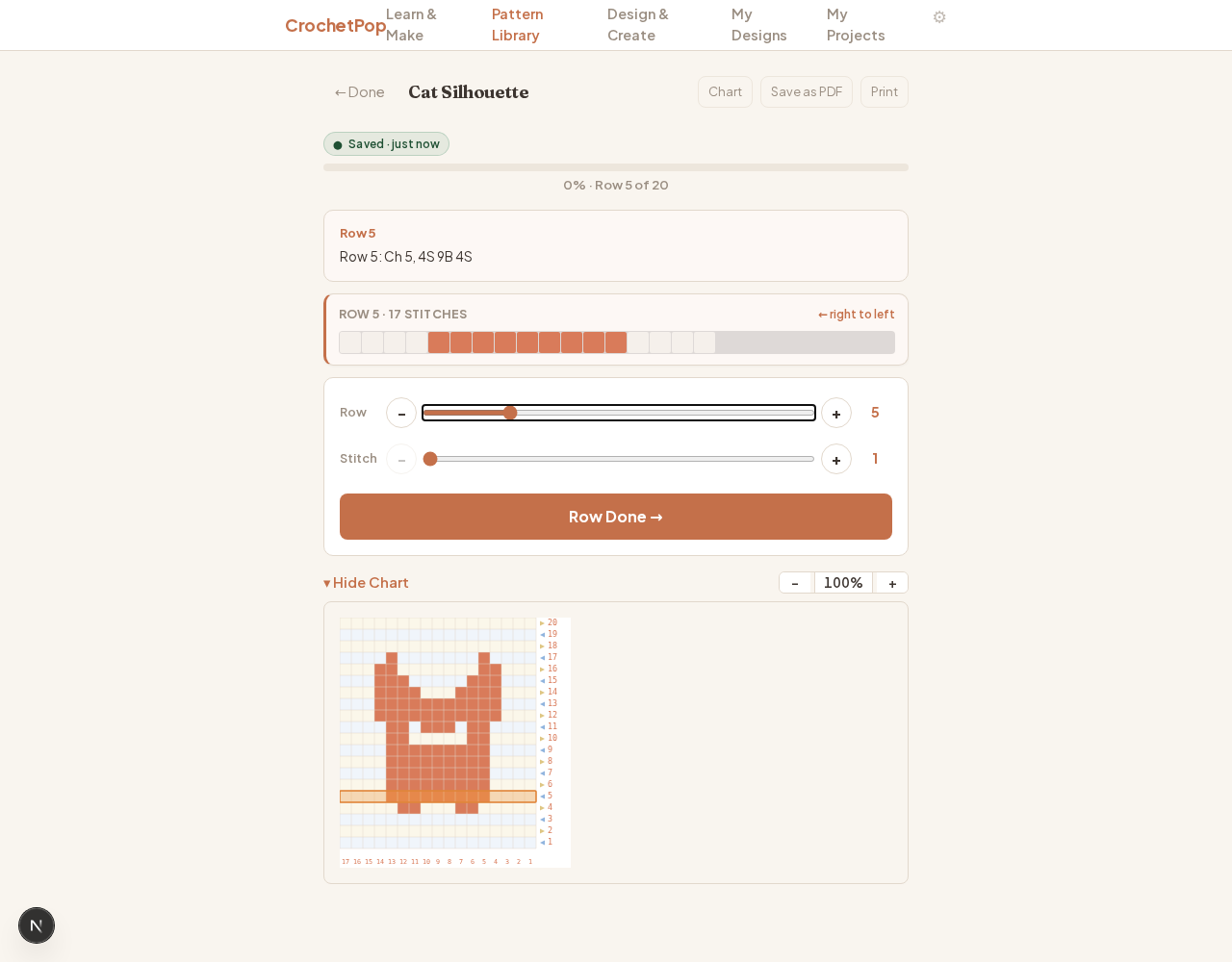
All three modes at once — the tracker on a built-in filet cat at Row 5 of 20.
- Row text. The exact instruction for the row you're on — turning chains, stitch counts, color changes — in plain language.
- Row block. A horizontal strip of colored cells showing what the row looks like as a fabric, with a direction indicator (← right to left, or → left to right).
- Chart with highlight. The full chart at the bottom, with an amber band overlay marking your current row so you can see it in context of the whole piece.
Example 1 — Filet cat (built-in, one click)
Open the filet cat tracker. It's a small symmetric cat silhouette: 14 rows tall, 11 stitches wide, single yarn color. A great first pattern to learn the tracker on because the chart is small enough to see the whole thing without scrolling.
Row text mode — read what to stitch

"Row 5: Ch 5, 4S 9B 4S" — chain 5 turning chain, then 4 spaces, 9 blocks, 4 spaces. That's compact filet notation; the tracker shows it word-for-word so you don't have to remember which cells are which.
Row block mode — see the colored sequence

Same row, painted as fabric. The "← right to left" badge is the direction you actually crochet — Row 1, 3, 5… work from the hook side leftward. Glance here to confirm the next 4 cells are spaces (lighter) before the cat's body starts.
Chart with highlight — see where you are in the whole piece
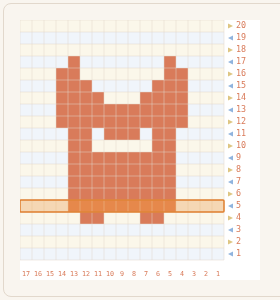
The amber band is your current row, anchored on the full chart. Drag the row slider on the page and the band follows — instantly, no flash, no lag. When you put the project down and come back tomorrow, the band tells you where you stopped without re-counting.
Example 2 — 5-color strawberries pixel (one-click demo)
The tracker isn't just for our built-in patterns. Any multi-color SC-pixel design works the same way. We've baked in a strawberries demo so you can see this without any Import dance — just click the button:
🍓 Open strawberries in the editor →
You'll land on this:
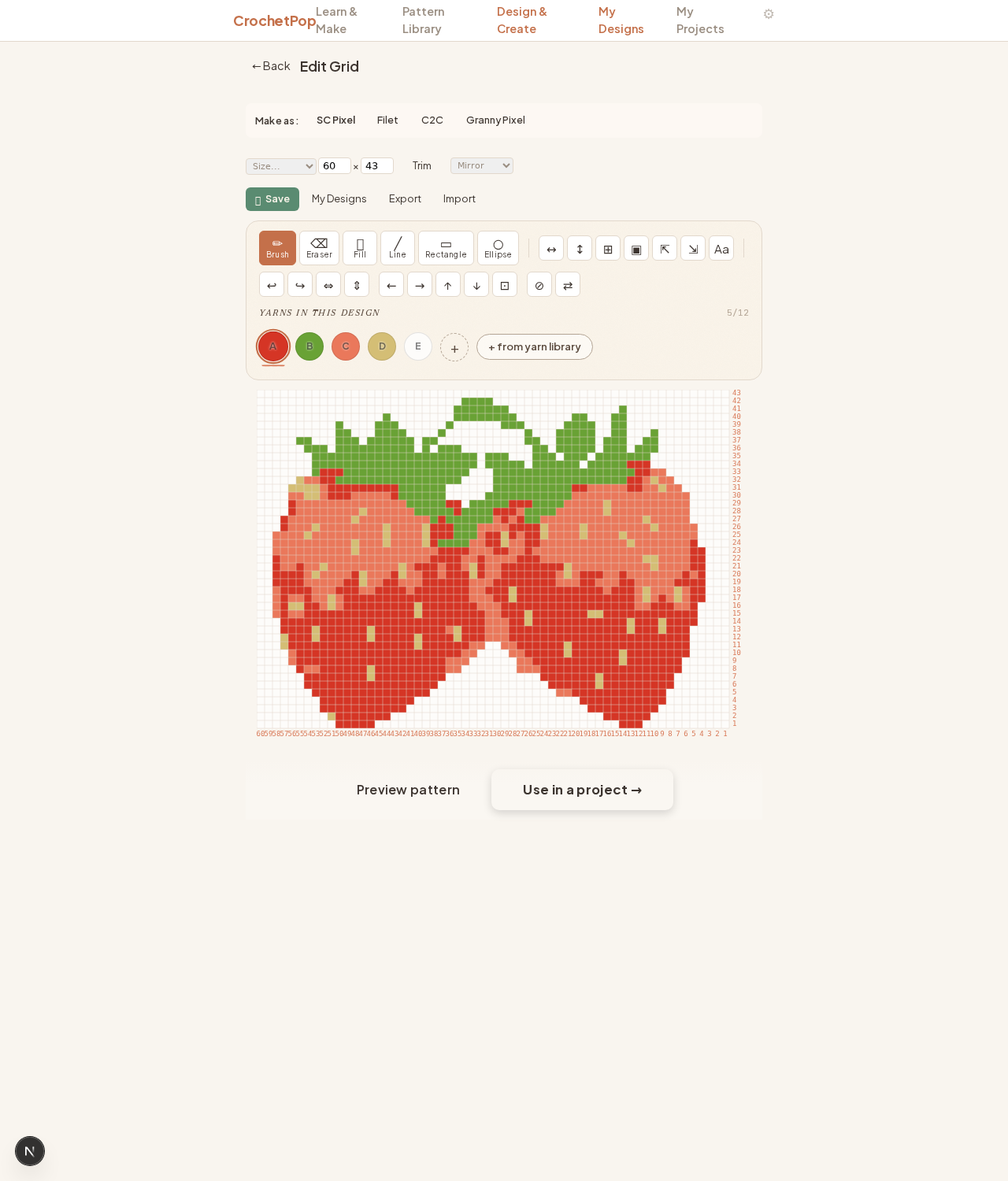
Two ripe strawberries with green leaves, 43 rows × 60 stitches, 5 yarn colors (Hot Red, Sage, Carrot, Buff, White). The SC Pixel tab is pre-selected because color-work isn't filet — filet only outputs 2 colors (block + mesh), so a 5-color design needs SC pixel, C2C, or granny pixel.
From here, click Use in a project → at the bottom. The tracker opens at Row 1 with all three modes wired up exactly like the filet cat, but now with a 5-color tapestry that shifts colors many times per row. The row block previews the next cells so you know whether to switch yarn now or finish two more stitches in the current color first. That's the moment "where am I?" stops being a question — every glance answers it three different ways.
Bringing your own pattern? Use the same flow with any saved .json: open the SC Pixel Studio, click any small template to reach the editor toolbar, then click Import. The strawberries fixture is also available as a download here for inspection or editing: strawberries.json.
When the tracker helps the most
- Multi-color rows. The row block shows the next 3 colors so you know whether to switch yarn now or finish two more stitches first.
- Long rows. A 35-stitch row with a tapestry color change halfway across is the exact pain point. The tracker counts in the row text, sequences in the block, locates in the chart.
- Projects you put down. Close the browser, take the kid to school, come back. The tracker remembers down to the stitch.
- Patterns from anywhere. The strawberries pattern came in via Import; the same flow accepts any SC-pixel / filet / C2C / granny-pixel grid you've drawn or downloaded elsewhere. Free, no signup, runs in your browser.
Open the tracker
Two ways to start: a built-in pattern with one click, or your own design via import.
Track the filet cat → Import your own pixel design →
Companion read: Live Row Tracker — never lose your place covers the deeper "why" and lists every construction the tracker supports.